17 September 2009

Pioneer CDJ-2000 and CDJ-900


Pioneer announces the release of their two new players and they are REALLY advanced!
Both players are shipped with the Rekordbox software from Pioneer, which is really Pioneers own DJ-software paralell to Traktor or Serato. And as a DJ dedicated to Traktor I can say that the palyers also work really nicely on their own.

Digital media:
Both players have an easy to reach USB input on the top of the player and RJ-45 (LAN) connection on the back called "LINK" for working with other players and both players can read from one source! The link also works when connecting CDJ-2000 to CDJ-900. It reads MP3, AAC, WAV and AIFF.

Midi-controller?
Both players also has a USB connector for connecting to a computer on the back, so they both can be used as midi-controllers.

CDJ-2000:
This player is basicly a CDJ-1000, but a massive update.
To quickly sum up the new features:

  • USB/SD-card reader (With accordinly a super-neat browsing feature)
  • 6,1" color-screen (Sweeeeet!)
  • 4 Beat-loop cutter (Auto-loops 4 beats based on BPM)
  • Needlesearch (A touch-bar for searching through the track)
  • Slip mode (Continues the track as you play around with loop, reverse or scratching)

CDJ-900 is an upgrade of the CDJ-800.

Pioneer has alot of media on their pages, so go check it out!
CDJ-2000: http://www.pioneerprodj.com/gear.aspx?product=CDJ-2000&cp=2
CDJ-900: http://www.pioneerprodj.com/gear.aspx?product=CDJ-900&cp=2

Videos:
CDJ 2000 video: http://www.youtube.com/watch?v=jJ-S9Xf3waY
CDJ 900 video: http://www.youtube.com/watch?v=q4LjQSyTr9U

28 July 2009

Traktor Scratch Pro 1.2 beta

The current available verison to Traktor Scratch pro is version 1.1 (1.1.2) where alot of bugs where mended and a couple of cool features was added. Native Instruments has now released version 1.2 for public beta testing. And this version has ALOT of cool upgrades.

The official release or new betaversion is sat to 15 september.
Let's hope they get a go for the full version.


New and improved features:

  • New "Elastique Pro" timestretching algorithm for best keylock quality with timecode
  • Number of separate effect units increased from two to four (Pro version only)
  • "Preparation List" feature with diamond icons, "Append/add next" menu functions
  • Adjustable "minimum playtime" for play count and history functions
  • Internal EQs enabled for external mixer mode
  • New track caching technology with reduced memory footprint
  • Improved Tap Tempo function
  • Additional effect algorithms: Beat Slicer, Formant Filter, Peak Filter (Pro version only)
  • Tag editing in Explorer node
  • Native HID support for Pioneer CDJ-400
  • Drag & Drop from decks to playlist
  • New "Progressive Sensitivity" option for Pitch Bend
  • Pitch Bend controller assignable to jog wheels
  • Customizable Cue Play button behaviour (Instant/On Release)
  • Improved cue point handling
  • 2 additional favorite slots

Sign up here:
http://www.native-instruments.com/forum/showthread.php?t=90223

Follow the official post form NI here:
http://www.native-instruments.com/forum/showthread.php?t=72703

22 May 2009

Allen & Heath X-One 4D Midi


To my sad supprise there was not a single good midi mapping for the 4D out there, so together with Tiny, we made a setup for Allen & Heath Xone 4D for Traktor Pro.

It's all there with documentation and everything. Hope you'll enjoy it, and give me feedback if something is not right.

Download from here

04 April 2009

Traktor CPU Load


I've noticed lately that my CPU load is quite large and wondered why.
I found out that I've sat on all the effects on on both effect chains.
So to ease of the CPU load I just sat the effect to "no Effect", and it worked...

Connecting two instances of Traktor

I'm going back home this easter and I'm gonna play together with two of my best friends on Long Friday (April 10th) at Tiger Tiger. We are gonna use two instances of Traktor and run them together and I looked into connecting the Master BPM from one of the computers to the other.
The concept is quite simple. One Traktor (The master) controll the Main BPM and the other Traktor (The slave) reads off it through MIDI.


Follow these 4 easy steps to make it work:
1. Connect a MIDI cable from midi out on the master to the midi in on the slave
2. Ensure that you have activated the midi on both computers: Preferences > MIDI Setup. Activate both the Input and Output devices.
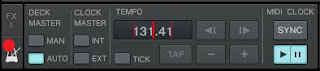
3. On the master Traktor activate Send MIDI Clock. The offset is for compensating the lag from the MIDI interface and cable.
4. Now set the correct master tempo settings:


Click on the metronome beneeth the FX1 to access the midi options.
4.1 On the picture is the setup for the master.
4.2 On the slave select Clock Master to EXT.
(See the Master buttons on the decs become inoperable on the slave Traktor)

Now the MASTER deck BPM will gradualy adjust the BPM on the master which then will controll the master tempo on the slave through the MIDI interface.

I got it working, but I'm not to happy with the stability. I needed some time to match the midi clock offset, but I used two of the same tracks and looped them and adjusted them untill satisfactory and that seems to be the way to do it. The master tempo on the slave computer seems to be working overtime trying to adjust and jumps up and down alot.
However it will still after that it was got off beat quite quickly.
Use Sync button on the MIDI Clock on the master to resync the slave. I noticed that it was even better to tur it of and back on ( Play / Pause ).

30 March 2009

Hotkeys documented


I've documented and somewhat updated my hotkey setup. Hope you'll enjoy it.
http://sites.google.com/a/sevendays.no/sevendays-dj-s/DJ-Crew/Fredrik-C3/files

And please vote in my poll. --->